Synopsis
cleora [OPTIONS] [inputs]...
Configuration Options
Input Files
- Usage: Positional arguments
[inputs]... - Description: Paths to input files
File Type
- Option:
--typeor-t - Description: Specifies the input file type.
- Possible values:
tsvorjson
Info
In a TSV file, columns should be separated by TABs, and values within one column's row should be separated by spaces. In the JSON format, multiple values are provided as an array.
Dimension
- Option:
--dimensionor-d - Description: Sets the embedding dimension size.
Number of Iterations
- Option:
--number-of-iterationsor-n - Description: Sets the maximum number of iterations for the embedding process.
Columns
- Option:
--columnsor-c - Description: Specifies column names (maximum of 12) with modifiers:
[transient::, reflexive::, complex::]. -
Modifiers:
-
transient— The column is used in the graph creation, but for the entities in this column embeddings won't be calculated.
Example:
There are two columns in our datauserandproduct, each row stores user id and id of a product user bought. We want to create embeddings of products, but users are what connects products, which are bought together.Useris then a transient column used to create graph and compute product embeddings. In this case user embeddings won't be created. Transient columns are connected with star expansion of hyperedges. -
complex— The column contains multiple entities (e.g., products, brands, transactions); in TSV format entities within the same column should be separated by spaces, in JSON format they should be stored in an array.
Example:
There are two columns in our data, one column stores user id and the other column stores all products bought by this user. The products column is then a complex column. -
reflexive— Each entity in the columns is connected with any other entity in the same column field . Every reflexive column will result in a separate graph and separate output file.
Example:
There is a column in data storing all products from one basket. In the created graph each product from a basket is connected with any other product in this basket.
The column is connected with clique expansion of hyperedges. -
ignore— The column won't be included in any graph and no output file is created for this field. Example:
There is a column in our data storing user IDs and another storing email addresses. We can use the user ID column to create a graph and ignore the redundant email column.
-
-
Allowed combinations:
transient,complex,transient::complex,reflexive::complex.
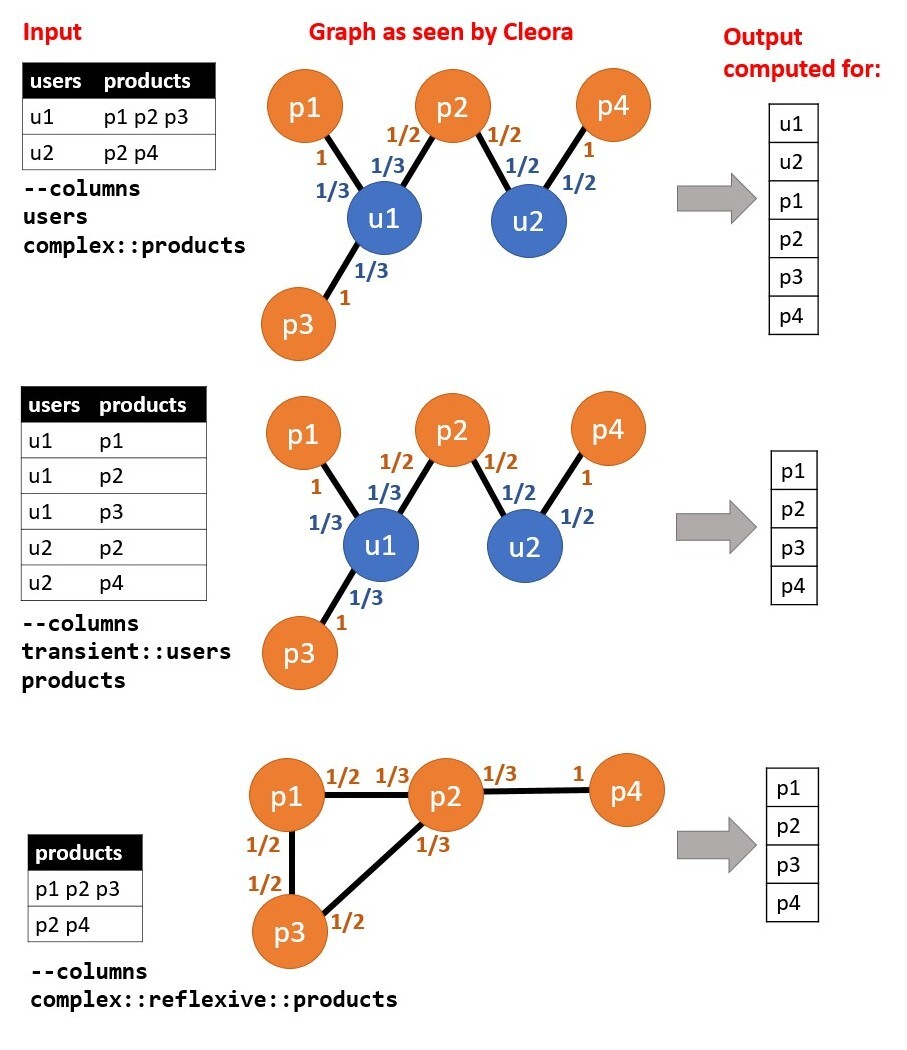
Example of column configuration:
The picture below presents data example with column configurations and resulting graphs. Input file required for this example should consist of TAB-separated columns, and space-seperated values within one column row:
Output Directory
- Option:
--output-diror-o - Description: Specifies the output directory for generated embeddings files.
Relation Name
- Option:
--relation-nameor-r - Description: Sets the name of the relation for output file name generation.
- Default:
emb
Example:
The file with embeddings, generated based on two columns user and product, is by default called emb__user__product.out. When we set --relation-name to purchase, the file will be called purchase__user__product.out.
Prepend Field Name
- Option:
--prepend-field-nameor-p - Description: Determines whether to add the field name to the entity identifier in the output.
- Possible values:
0or1 - Default:
0
Example:
Consider an example of embeddings generated for the product column. In each row of the output file, we have the product identifier, the number of nodes with this product (indicating in how many rows of our data the product occurred), and the generated embedding:
1388 120 0.03775605 -0.00534315 -0.07677672 -0.033221997 -0.11690934 0.07979556 -0.047545113 0.04019881 0.11354096 0.09381865 0.0139150405 -0.041348357
If we set --prepend-field-name to 1, we will get:
product__1388 120 0.03775605 -0.00534315 -0.07677672 -0.033221997 -0.11690934 0.07979556 -0.047545113 0.04019881 0.11354096 0.09381865 0.0139150405 -0.041348357
Log Every N
- Option:
--log-every-nor-l - Description: Logs output every N lines.
- Default: 10000
In-Memory Embedding Calculation
- Option:
--in-memory-embedding-calculationor-e - Description: Chooses between calculating embeddings in memory (
0) or using memory-mapped files for efficiency (1). - Possible values:
0or1 - Default:
1
Output Format
- Option:
-f - Description: Sets the format of the output file. Possible formats are
.txt(textfile) and.npy(numpy). - Possible values:
textfileornumpy - Default:
textfile
Seed
- Option:
--seedor-s - Description: sets integer seed for embedding initialization
Version
- Option:
--versionor-v - Description: Prints Cleora version information.
Examples of Cleora Configuration
For input file1.tsv:
run:chmod +x cleora
./cleora --type tsv \
--columns="user complex::reflexive::product" \
--dimension 128 \
--number-of-iterations 5 \
--relation-name=test_relation_name \
--prepend-field-name 0 \
file1.tsv
Note
Before the first run, ensure that the Cleora binary file has execute permissions (chmod +x).
Output Format
Output files are saved in the current location or under --output-directory. Each row in the file consists of:
- Entity ID — the ID of the entity for which the embedding is generated; this is the first number in a row.
- Number of nodes — how many nodes were created for the given entity ID; this is the second number in a row.
- Embedding — the embedding generated for a given entity ID; all subsequent numbers.
Example:
We use Cleora to create embeddings for the product column. We get the output file where each row stores: the product ID, information about how many times the product occurred in the input data (which translates to the number of nodes), and the embedding of this particular product.
1388 120 0.03775605 -0.00534315 -0.07677672 -0.033221997 -0.11690934 0.07979556 -0.047545113 0.04019881 0.11354096 0.09381865 0.0139150405 -0.041348357